

How to Sell Digital Downloads: Templates, Presets, and Ebooks From Your Link in Bio

Selling digital downloads like templates, presets, and ebooks from your link in bio page turns a file you already made into a product you can sell over and over with zero inventory.
Why digital downloads are the easiest first product to sell
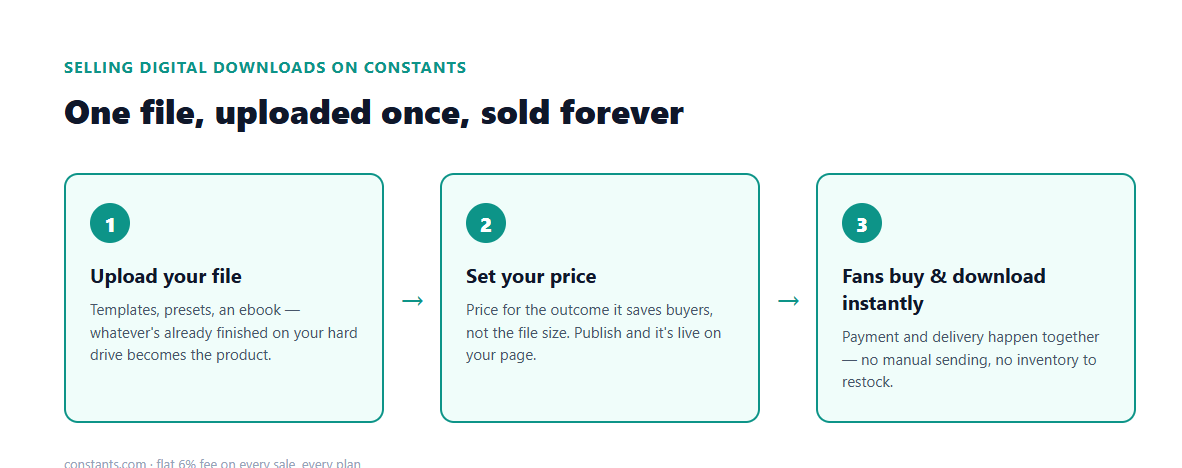
There's no shipping, no printing, and no fulfillment lag. Once the file is uploaded, every sale after the first one is pure repeat revenue for the same amount of work. It's also the easiest starting point for most creators, because you probably already have something sellable sitting on your hard drive: a Lightroom preset pack, a Notion template, a swipe file, a PDF guide. Digital products turn that file into a listing in minutes instead of a project.
Setting up your first digital product listing
From your Shop tab, choose Digital Product as the type, upload the file buyers will receive, and write a summary that actually says what's inside — vague descriptions cost you sales more than low follower counts do. Set your price, publish, and the product shows up on your page immediately. Buyers get the file the moment they pay, so there's nothing for you to manually send after each sale.
What sells: templates, presets, and ebooks compared
Different formats fit different audiences. Templates — Notion boards, Canva kits, spreadsheets — sell well to other creators and small business owners who want to skip building something from scratch. Presets, like Lightroom or Photoshop actions, sell to photographers and content creators who want a faster, consistent edit. Ebooks and written guides sell to people who'd rather buy your expertise as a document than book your time directly. Pick whichever format matches something you've already finished, not whichever sounds the most sellable on paper.
Pricing digital downloads and keeping more of each sale
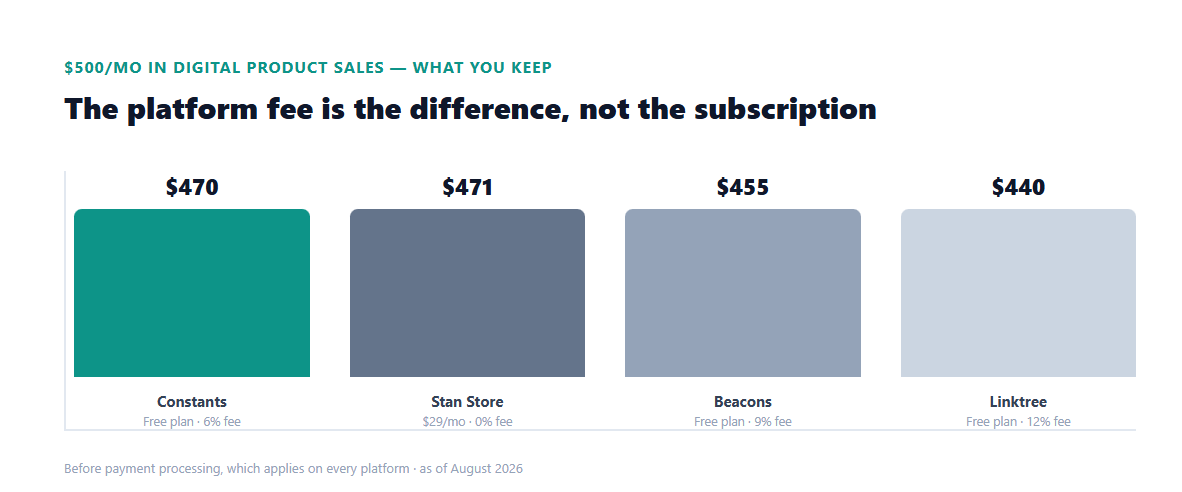
Digital products carry no printing or shipping cost, so price for the value of the outcome, not the size of the file. Constants charges a flat 6% fee on every sale, on every plan, so a $20 template nets you the same share whether you're on the free plan or Premium. Full breakdown at pricing page.
Getting your first sales
Once it's live, say exactly what's inside when you promote it — "20 Lightroom presets, $12" converts better than a vague "check my bio." Pin it near the top of your shop while you're actively pushing it in posts and Stories, then let it sit permanently once the promo push is over. Digital products don't expire or run out of stock, so an old caption can keep sending buyers to the same listing months later without any extra work from you.