
Gumroad Fees in 2026: What Gumroad Takes From Every Sale

Constants and Gumroad both promise a fast way to sell digital products online, but the fee structure is where the real difference shows up on every single sale.
How Gumroad's Fees Work
Gumroad has no monthly plan. Every direct sale carries a 10% commission plus a flat $0.50, on top of standard card processing at 2.9% plus $0.30. If a buyer finds your product through Gumroad's Discover marketplace instead of your own link, the fee jumps to a flat 30% that covers processing too. For someone selling templates, presets, or an ebook straight from a link in bio, most traffic comes from your own audience, so the 10%-plus-processing rate is the one that actually matters.
What Constants Charges Instead
Constants charges a flat 6% platform fee on digital product sales, every plan, with the same card processing on top (2.9% plus $0.30). There is no separate Discover-style marketplace fee to worry about, and no monthly plan requirement to unlock selling. The free Starter plan can sell from day one.
What You Actually Keep From a $10, $25, or $50 Sale
Here is what lands in your account on a direct card sale from your own link, after Gumroad's 10% plus $0.50 and card processing at 2.9% plus $0.30. A $10 ebook keeps $7.91, about 79%. A $25 template pack keeps $20.97, about 84%. A $50 course keeps $42.75, about 85.5%. If the same buyers arrive through Gumroad Discover, the flat 30% marketplace fee leaves $7.00, $17.50, and $35.00. On Constants, the 6% platform fee plus the same processing leaves $8.81, $22.47, and $45.25 on those three sales.
The Gumroad Fees That Are Easy to Miss
The flat $0.50 per sale hits cheap products hardest. On a $5 download, Gumroad's fee plus processing comes to about $1.45, so you keep roughly $3.55, or 71%, where the same sale keeps $4.25 on Constants. Card processing is not part of Gumroad's 10%, and PayPal fees apply separately when buyers pay that way. If you refund a sale, Gumroad returns its own fee but the processing portion is gone. Two things work in Gumroad's favor: it acts as merchant of record, so it collects and remits sales tax and VAT for you, and once your paid sales pass $20,000 in a calendar month, new direct sales that month drop to 5% plus $0.50. For everything beyond fees, see the full Constants vs Gumroad comparison.
The Math on a $50 Product
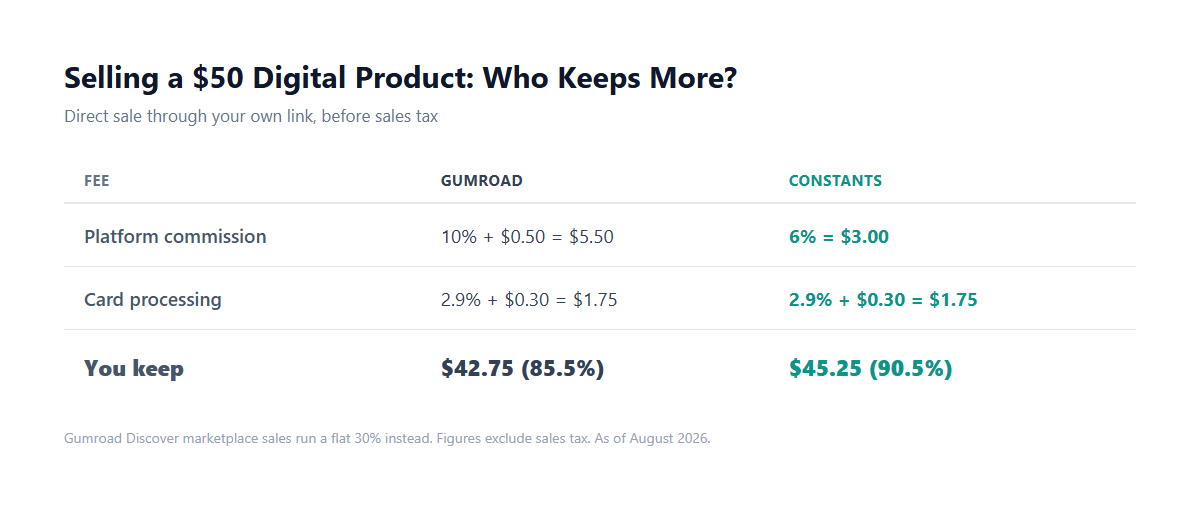
Run the same $50 digital download through both platforms and the gap is real, not marketing math. On Gumroad, the 10% commission plus $0.50 flat fee comes to $5.50, and card processing adds another $1.75, for $7.25 in total fees, so the seller keeps $42.75, or about 85.5% of the sale. On Constants, the 6% platform fee is $3.00, processing adds $1.75, for $4.75 in total fees, so the seller keeps $45.25, or about 90.5%. That is roughly $2.50 more per $50 sale, which adds up fast for anyone selling more than a handful of products a month. Figures exclude sales tax, which both platforms calculate and remit similarly, and are current as of September 2026.
Beyond the Fee
Gumroad is a single-purpose storefront. It is excellent at hosting a product page and processing a checkout, but it does not do much else. Most Gumroad sellers still need a separate link in bio page or website to send traffic to their product link in the first place, and a separate tool again if they ever want a booking calendar, a membership, or just a normal profile people can follow. Constants puts the storefront on the same page as your bio, your content, and your community, so there is one link to share instead of three or four. See the digital downloads guide for what selling this way looks like in practice.
Pick Gumroad If, Pick Constants If
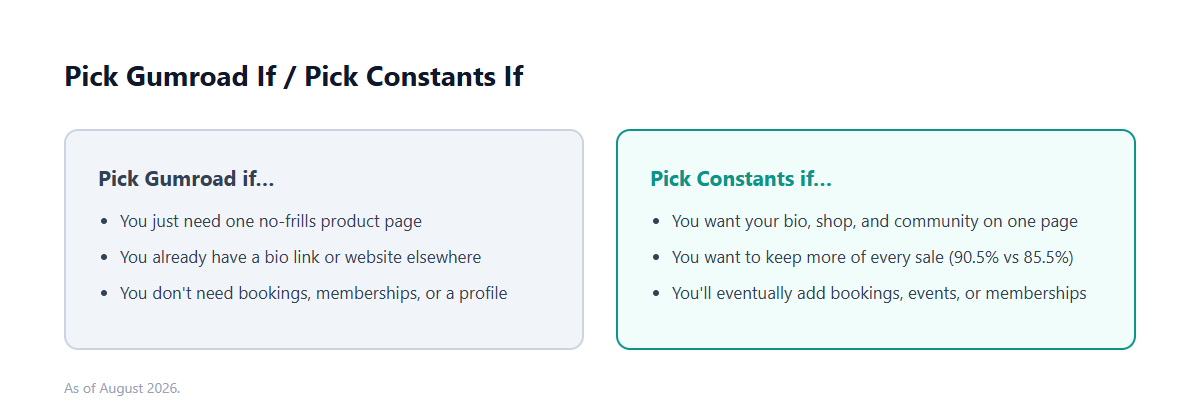
Gumroad still makes sense if all you need is a single, no-frills product page you can drop a link to from somewhere else. Constants makes more sense if you want that product page, your bio, and everything else about your presence living in one place, while keeping more of every sale doing it. If you are weighing more than two platforms at once, the decision guide covers how to think about it. See the full plan breakdown on the pricing page before deciding.